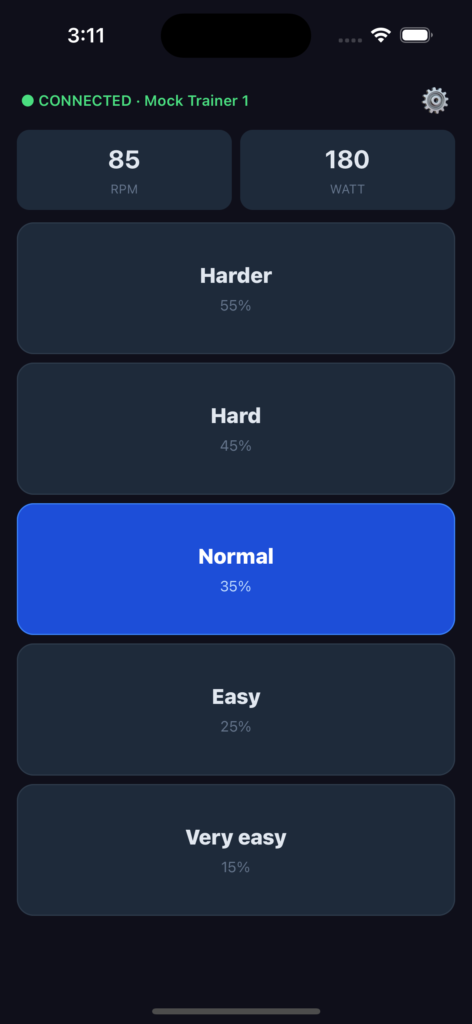
In the weekend of March 20 / 21 2026 I set out to create a mobile app. Why? Due to sheer frustration.
A couple of weeks earlier I decided I wanted to be more active — do an activity with an elevated heart rate a couple of times a week. Because I’ve been coping with ankle, knee, and back problems over the last two years, I haven’t been able to sport as much as I used to, and the scale is showing the harsh truth.
I own a smart trainer, a Zwift Hub, so I wanted to get back on it and do some rides. But I don’t like long rides, so I thought I’d do spinning workouts. Turns out those are very hard to find. None of the big cycling apps — Zwift, Rouvy, MyWoosh, etc. — have them. Eventually I found that Apple Fitness+ had some great workouts. However, Fitness+ can’t control a smart trainer. So I set out to combine both: spinning workout on the iPad mounted on the handlebars, and the iPhone in a holder next to it running Rouvy with the flattest track I could find, manually changing the resistance. Well, you can probably guess that this really sucked. The spinning workout itself was great, but it was nearly impossible to quickly change the resistance by pressing those tiny buttons on the iPhone — and I needed to tap multiple times just to go from level 16 to 10 for any noticeable change.
I’m an experienced software developer and agentic engineer. Surely I could build something better.
So on Friday March 20 I set off to create a simple app with a few big buttons that would directly control the resistance of the smart trainer. Using Claude Code I had a working app within two days. The trickiest part was getting the Bluetooth connection right. The research Claude did initially was incorrect and didn’t work. After manually downloading the official Bluetooth Fitness Machine protocol specs and feeding them into Google NotebookLM, I quickly figured out what had gone wrong and had NotebookLM generate a document to steer Claude in the right direction. After that, the Bluetooth connection worked instantly.
So the app worked. Of course I wanted to share it with the world. So — how do you get an app on the App Store? With a LOT of patience, apparently.
The app is built with React Native and Expo. Their cloud platform gave me a workflow for building and publishing to the App Store, which was great — but getting all the required credentials sorted was a nightmare. Eventually it worked, I got the app built, submitted, and available on TestFlight. Then came the review process. I had high hopes it would be done within 48 hours. It was not. When the review came back it was declined — I needed to provide a video proving the app could connect to the smart trainer and control it. That evening I made the video and uploaded it. The reviewer said “reply to this email and I’ll pick it up within 24 hours.” He did not. It took almost another week, but finally the app was approved. Victory? Yes  and no
  .
.
Before the app could be published, more forms needed to be filled in and signed. One of them was for the European Digital Services Act (DSA). Because I’m publishing through my company account, I needed to declare myself as a trader. Fair enough — but I think I originally created my Apple Developer account back in 2009, when I was experimenting with iOS and Objective-C. Since then my business has changed its legal form and I’ve moved a couple of times, so the business details on the account were badly out of date. I had already noticed this and submitted an update request. Meanwhile the app had been reviewed and approved, but my business details still hadn’t changed. With no way to view or comment on the open ticket, I eventually created two more tickets just asking Apple to hurry up. Someone finally got back to me asking for proof of company name, ownership, and address. I provided it. Then it took another two weeks for Apple to process it. Then I could finally sign the DSA — only to wait again for that to be approved, during which they asked for the same proof of business and address all over again. I uploaded the same document. And then, finally, on Monday May 11 I got the notification from Apple: the DSA was approved and the app was available in the EU.
Whoohooo!! 
 From working app to published on the App Store: two whole months.
But now it’s out there. The name: Quick Gear. Find it on the AppStore.
Try it out — it’s free !!
Source code is on GitHub.
Leave comments, report issues, let me know which other smart trainers it works with.
And if anyone could test it on Android, I’d love to build that version too. Curious to find out how long thatapproval process takes.